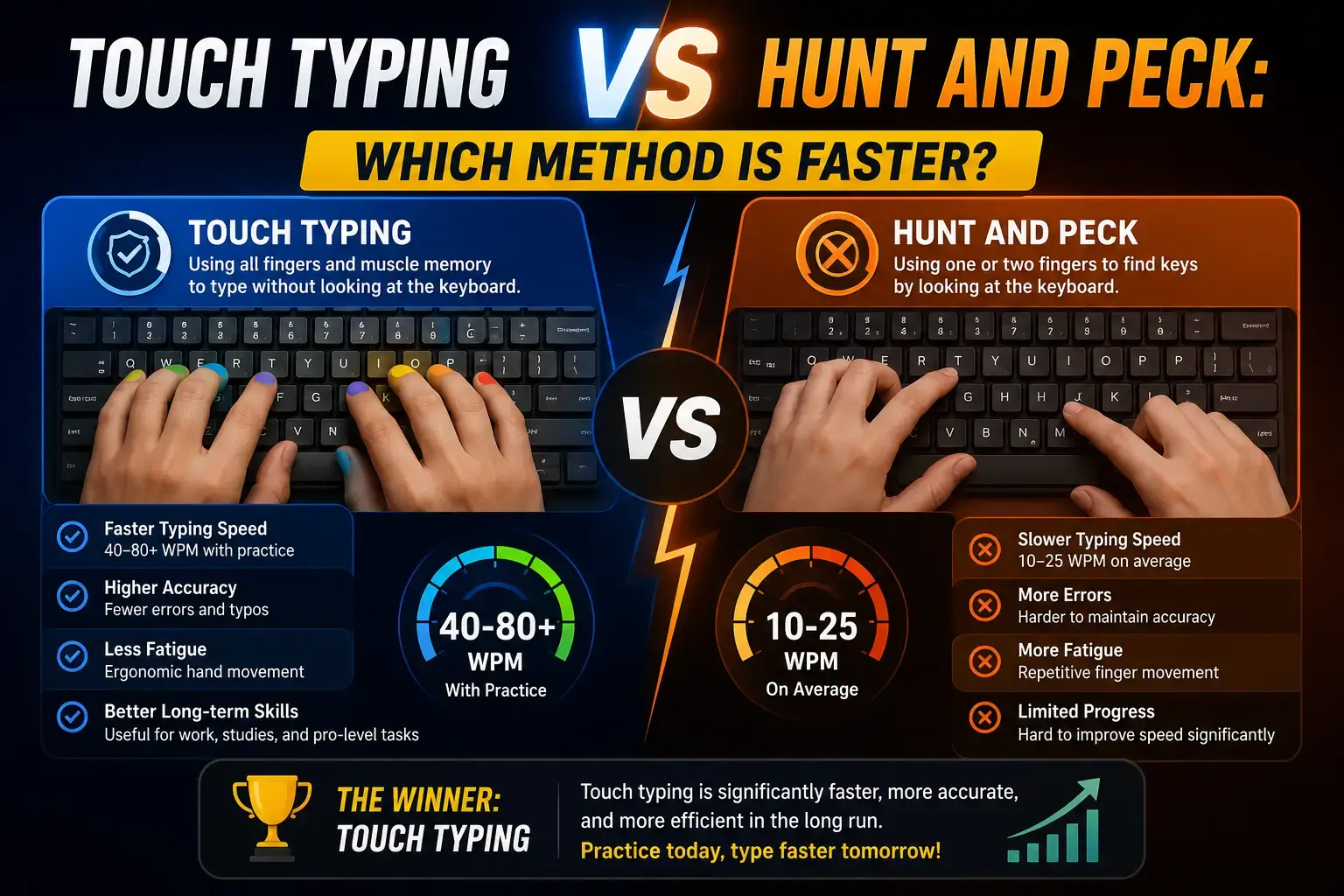
Touch typing vs. hunt-and-peck is the classic typing debate, and the answer is clear. Touch typing is far faster, reaching 60 to 100 WPM, while hunt and peck typists usually stay stuck below 40 WPM. Touch typing uses all ten fingers and muscle memory, while hunt and peck relies on looking at the keyboard. This guide compares both methods, shows the real speed difference, and explains how to switch for good.
Most people type the way they first learned, never questioning if it is the best method. But your typing style sets a ceiling on your speed. Understanding the difference can unlock a huge jump in typing speed. Let us break down both methods.
What Is Touch Typing?
Touch typing is typing without looking at the keyboard. You use muscle memory to know where each key is. All ten fingers work together, each responsible for its own set of keys.
Your fingers rest on the home row keys. When you touch type, your eyes stay on the screen the whole time. This lets you type fast and catch errors instantly.
What Is Hunt and Peck?
Hunt and peck is typing by looking for each key, then pressing it. Most people use only two to four fingers. The name comes from how you hunt for a key, then peck at it.
This method feels natural because it needs no training. But it has a low speed limit. Your eyes must jump between the keyboard and screen constantly.
Touch Typing vs Hunt and Peck: Speed Comparison
The speed gap between these two methods is huge. Here is how they compare.
| Feature | Touch Typing | Hunt and Peck |
|---|---|---|
| Average speed | 60 to 100 WPM | 20 to 40 WPM |
| Fingers used | All 10 | 2 to 4 |
| Eyes on screen | Yes | No |
| Accuracy | High | Lower |
| Learning time | 2 to 4 weeks | None |
| Error spotting | Instant | Delayed |
The verdict: Touch typing is roughly twice as fast as hunt and peck for most people.
Not sure which method you use? Take a one minute typing test and watch your hands. If you look down often, you are hunting and pecking.
Pros and Cons of Each Method
Both methods have trade offs. Here is an honest look at each.
Touch Typing Pros and Cons
Pros:
- Much faster speed, often double
- Higher accuracy with fewer errors
- Less strain on your neck and eyes
- Eyes stay on the screen for better focus
Cons:
- Takes 2 to 4 weeks to learn
- Feels slow and awkward at first
Hunt and Peck Pros and Cons
Pros:
- No learning needed
- Feels comfortable right away
Cons:
- Low speed limit, usually under 40 WPM
- More errors and slower error spotting
- Tiring on your neck from looking down
- Breaks your focus and rhythm
Why Touch Typing Wins
Touch typing wins because it removes the biggest time waster: looking at the keyboard. Every glance down breaks your flow and slows you.
With touch typing, your fingers know the keys by memory. Your brain focuses on the words, not the hunt. This is why every fast typist in the world uses touch typing.
Studies show touch typists often type two to three times faster than hunt and peck typists. The gap only grows with practice.
Can Hunt and Peck Typists Be Fast?
Some hunt and peck typists get surprisingly quick, reaching 40 to 50 WPM. But this is rare and takes years. Even the fastest hunt and peck typist hits a wall that touch typists blow past.
The truth is simple. If you want real speed, touch typing is the only reliable path.
How to Switch From Hunt and Peck to Touch Typing
Switching feels hard at first, but it pays off fast. Follow these steps.
Step 1: Learn the Home Row
Place your fingers on A, S, D, F for the left hand and J, K, L, semicolon for the right. Feel the bumps on F and J to find your spot without looking.
Step 2: Practice Slowly
Start slow and correct. Do not rush. Your goal at first is accuracy, not speed. Type simple words while keeping your eyes on the screen.
Step 3: Cover Your Hands
Try typing without looking. Cover your hands with a cloth if needed. This forces your fingers to learn the keys by memory.
Step 4: Practice With Real Text
Once you know the keys, practice on real sentences. Use the custom typing test to type any text you like, or the paragraph typing test for full passages.
Step 5: Test Weekly
Track your speed each week. You will feel slow for the first few days, then faster than ever before.
How Long Does It Take to Learn Touch Typing?
Most people learn touch typing in 2 to 4 weeks with daily practice. The first week feels slow and frustrating. By week two, your speed passes your old hunt and peck level. By week four, you type faster than you ever did before.
The short term dip in speed is worth the long term gain. Push through it.
Frequently Asked Questions
Is touch typing faster than hunt and peck?
Yes, touch typing is much faster. Touch typists reach 60 to 100 WPM, while hunt and peck typists usually stay below 40 WPM. Touch typing is roughly twice as fast for most people.
What is the difference between touch typing and hunt and peck?
Touch typing uses all ten fingers and muscle memory without looking at the keyboard. Hunt and peck uses two to four fingers and requires looking down to find keys. Touch typing is faster and more accurate.
Can hunt and peck typists type fast?
Some reach 40 to 50 WPM, but this is rare and takes years. Even the fastest hunt and peck typists hit a speed wall that touch typists easily pass. For real speed, touch typing is the better path.
How long does it take to learn touch typing?
Most people learn touch typing in 2 to 4 weeks with daily practice. The first week feels slow, but by week two your speed passes your old level. By week four, you type faster than ever.
Is it worth switching to touch typing?
Yes, switching is worth it. You may feel slow for a few days, but you gain double the speed and better accuracy for life. The short term dip pays off quickly.
Final Thoughts and Experience
Touch typing vs hunt and peck is not really a contest. Touch typing wins on speed, accuracy, and comfort. The only reason people stick with hunt and peck is that switching feels hard at first.
But the switch takes just a few weeks and pays off for life. If you type every day, learning touch typing is one of the best time investments you can make. Ready to test your current method? Take a free typing test now and see how much faster you could type.